In the previous part, we learned how to find the base address of any loaded module via the TEB and PEB. Today we’ll take the second step: from a module’s base address, we’ll determine the address of a specific exported function. This part will be devoted mostly to the theory of the PE structure, which we’ll tie together at the end with a short assembly demonstration.
Prerequisites
Before reading this part, it is a good idea to read and understand the previous two parts. It is also very helpful to have at least a basic idea of what virtual memory and a pointer are.
Every structure we describe in the article, we will also show live in WinDbg on the kernel32.dll library in a real process.
Let’s launch the 64-bit WinDbg and open notepad.exe in it as a new process. We can do this either through the menu File -> Launch Executable, where we locate the file C:\Windows\System32\notepad.exe in the dialog, or we can do it via the command line:
windbg.exe C:\Windows\System32\notepad.exe
WinDbg starts the process and stops it on its own right at the beginning, before the application’s own code has a chance to start running. We call this stop the initial breakpoint. We can recognize it by the 0:000> prompt in the command window. At this point the process is halted, its memory is mapped, and we can begin to examine and search it.
Note: WinDbg comes in two versions: 32-bit (x86) and 64-bit (x64). Beginners very often mix them up and then wonder why the commands they use don’t work as they should. Because this series focuses on 64-bit Windows and 64-bit modules, we will use exclusively the 64-bit (x64) version. You can tell which version is currently running from the window title or via the version command in the command window. The exact location of windbg.exe depends on how WinDbg was installed.
The PE format
Every executable file — that is, .exe, .dll, .sys, and others — on Windows uses the so-called PE (Portable Executable) format[1][2][3]. It is a structured binary format that tells the system how to load the file into memory, where the code begins, what dependencies the file has, and which functions the module exports for use by other modules — which is the key piece of information for us.
When the Windows operating system loads a DLL into memory, it preserves the structure of the PE format. This means that from a module’s base address in memory, we can walk through the file using the PE header directly at runtime.
Now let’s look at where in memory the kernel32.dll library resides. We find out the base address — that is, the starting address to which we will add all the offsets and relative addresses (RVAs) — using the lm (list modules) command:
0:000> lm m kernel32
Browse full module list
start             end                 module name
00007ffd`bca50000 00007ffd`bcb19000   KERNEL32   (deferred)
Of the three columns shown in the output, we will mainly be interested in the start column, which contains the module’s base address. It is at this address that the IMAGE_DOS_HEADER structure begins, which we will look at first.
When you test this, the address itself will almost certainly be different from the one in this text. This is caused by ASLR (remember the previous part?). Because of ASLR, the module is mapped to a different base address on each run. The specific values inside the headers may also differ slightly. The images in the article are illustrative. Only the offsets (RVAs) inside the module remain unchanged.
The (deferred) label at the end of the line merely tells us that WinDbg has not yet loaded this module’s symbols. It will do so only when we need them. For now, the base address is all we need.
The path through the PE headers
![Vertical memory map of the mapped module from top to bottom: IMAGE_DOS_HEADER, DOS stub, IMAGE_NT_HEADERS (with the PE Signature, IMAGE_FILE_HEADER, and IMAGE_OPTIONAL_HEADER containing DataDirectory[0]), sections, and IMAGE_EXPORT_DIRECTORY. The e_lfanew field at offset 0x3C points with an arrow to IMAGE_NT_HEADERS; DataDirectory[0].VirtualAddress points to IMAGE_EXPORT_DIRECTORY.](/images/pe_header_chain_en.png "The path from the base address to the Export Directory via `e_lfanew` and `DataDirectory[0]`.")
DOS Header
At the base address of every PE file begins the IMAGE_DOS_HEADER structure[4]. The format originates from the original MS-DOS EXE file (the so-called "MZ executable"), which was introduced as a more capable alternative to the simpler .COM format (both formats coexisted throughout the entire DOS era). The "MZ" signature consists of the initials of Mark Zbikowski, one of the lead architects of MS-DOS, who designed this format in 1983. The name of an engineer from 1983 is still on the first two bytes of every .exe, .dll, .sys, and other file today, making it one of the most enduring easter eggs in software history.
During the design of the new PE format (derived from Unix’s COFF) in Windows NT, Microsoft decided to keep the old DOS header at the beginning for the sake of backward compatibility. Behind it, the so-called DOS stub is inserted. This is a small, real DOS program that runs if someone tries to launch the PE file under the MS-DOS operating system, and it prints the typical message:
This program cannot be run in DOS mode.
The key new addition compared to a pure DOS EXE is the last field, e_lfanew, which DOS ignores but which the Windows loader reads to find where in the file the actual PE header resides (IMAGE_NT_HEADERS with the "PE\0\0" signature).
The structure looks as follows:
typedef struct _IMAGE_DOS_HEADER        // size 0x40
{
    WORD   e_magic;                     // offset 0x00
    WORD   e_cblp;                      // offset 0x02
    WORD   e_cp;                        // offset 0x04
    WORD   e_crlc;                      // offset 0x06
    WORD   e_cparhdr;                   // offset 0x08
    WORD   e_minalloc;                  // offset 0x0A
    WORD   e_maxalloc;                  // offset 0x0C
    WORD   e_ss;                        // offset 0x0E
    WORD   e_sp;                        // offset 0x10
    WORD   e_csum;                      // offset 0x12
    WORD   e_ip;                        // offset 0x14
    WORD   e_cs;                        // offset 0x16
    WORD   e_lfarlc;                    // offset 0x18
    WORD   e_ovno;                      // offset 0x1A
    WORD   e_res[4];                    // offset 0x1C
    WORD   e_oemid;                     // offset 0x24
    WORD   e_oeminfo;                   // offset 0x26
    WORD   e_res2[10];                  // offset 0x28
    LONG   e_lfanew;                    // offset 0x3C
} IMAGE_DOS_HEADER, *PIMAGE_DOS_HEADER;
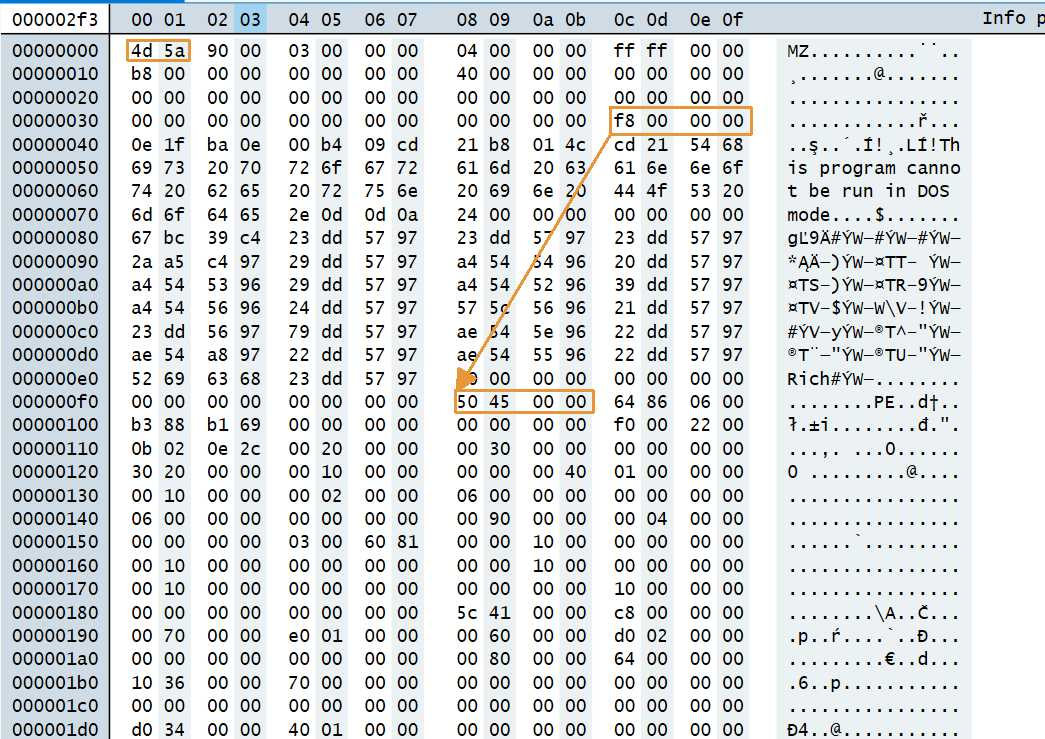
Let’s first verify that the "MZ" signature really does reside at the module’s base address, as we saw in the hex dump above. Using the db (display bytes) command, we print the first two bytes at the base address of kernel32:
0:000> db kernel32 L2
00007ffd`bca50000  4d 5a                                            MZ
On the left is the address, in the middle the two bytes 4d 5a, and on the right their ASCII interpretation, namely MZ. This is exactly the e_magic field, whose value is 0x5A4D (it is a WORD data type, so the byte order in memory is 4d 5a — see endianness). With this, we have practically confirmed that the MZ signature really does reside at the beginning of the module, that is, that we are standing at the beginning of the DOS header.
Most of the fields (e_cblp through e_ovno, plus the reserved ones) are completely ignored by modern Windows. In practice, only two things about the PE file matter:
e_magicmust be 0x5A4D ("MZ")e_lfanewis a signed 32-bit value (a file offset) at offset 0x3C which, for a valid PE, points to the PE header (IMAGE_NT_HEADERS)
By checking e_magic, we verify that we’re at the start of an MZ file, and by adding e_lfanew to the base we obtain the address of the IMAGE_NT_HEADERS structure, whose validity we confirm only by checking the PE signature.
NT Headers address = base address + e_lfanew
Now we need to find out the value of the e_lfanew field, which is at offset 0x3C and which tells us at what address in the module we will find the NT headers. We read the value as a 32-bit data type using the dd (display dwords) command, directly from the address base + 0x3C:
0:000> dd kernel32+0x3c L1
00007ffd`bca5003c  00000100
WinDbg has already assembled the four bytes into a single value in the correct order (little-endian) for us, so we can read 0x00000100 directly. This is the RVA — or rather the file offset — at which the IMAGE_NT_HEADERS structure begins. We obtain its address in memory by adding it to the base:
0:000>  ? kernel32 + 0x100
Evaluate expression: 140727768383744 = 00007ffd`bca50100
As an aside — as to why it’s not wise to blindly rely on the documentation — I’ll also mention that the space between the end of the IMAGE_DOS_HEADER structure and the start of IMAGE_NT_HEADERS (that is, the DOS stub region that e_lfanew points to) is not checked by the system loader and can be replaced with custom data or even custom code. The offset stored in e_lfanew can, moreover, point practically anywhere, including this region. A challenge focused on precisely these kinds of manipulations of the PE file structure, with the goal of creating the smallest possible functional PE file. Alexander Sotirov then described the creation of the so-called TinyPE in detail[5].
NT Headers
IMAGE_NT_HEADERS[6] is the structure pointed to by e_lfanew from the DOS header — that is, the real "core" of the PE file. Whereas we can think of the DOS header as a fossil that lingers in PE files for compatibility reasons, the NT headers are where the data the Windows loader actually uses begins. The structure is as follows:
typedef struct _IMAGE_NT_HEADERS                // size 0x108
{
    DWORD                   Signature;          // offset 0x00
    IMAGE_FILE_HEADER       FileHeader;         // offset 0x04
    IMAGE_OPTIONAL_HEADER   OptionalHeader;     // offset 0x18
} IMAGE_NT_HEADERS, *PIMAGE_NT_HEADERS;
It’s really just a kind of wrapper for a signature and two nested structures. The Signature field defines the start of the PE file and is defined by the constant "PE\0\0", i.e. 0x00004550.
In the previous section, we calculated that the NT headers begin at the address base + e_lfanew. Let’s verify that the "PE" signature really does reside there. We read the first 32-bit value at this address:
0:000> dd kernel32+0x100 L1
00007ffd`bca50100  00004550
The value 0x00004550 corresponds to the characters P, E, 0, 0 (in memory 50 45 00 00). This is the Signature field of the IMAGE_NT_HEADERS structure, and for us it confirms that we really are at its beginning.
The IMAGE_FILE_HEADER[7] structure is essentially a pure COFF header, and I mention it here only for completeness, since we won’t be using any values from it. The structure looks as follows:
typedef struct _IMAGE_FILE_HEADER  // size 0x14
{
    WORD  Machine;                 // offset 0x00
    WORD  NumberOfSections;        // offset 0x02
    DWORD TimeDateStamp;           // offset 0x04
    DWORD PointerToSymbolTable;    // offset 0x08
    DWORD NumberOfSymbols;         // offset 0x0C
    WORD  SizeOfOptionalHeader;    // offset 0x10
    WORD  Characteristics;         // offset 0x12
} IMAGE_FILE_HEADER, *PIMAGE_FILE_HEADER;
The IMAGE_OPTIONAL_HEADER[8] structure, by contrast, is — despite its confusing name — absolutely essential for our purposes and is always present in PE files. Historically, this name comes from the COFF format, where for object files (.obj) this part really is optional, whereas for executable files (.exe, .dll) it is mandatory. So it’s not some crazy whim of a developer, but a historical artifact. Something else that may seem similarly odd is the fact that in 2003, with the arrival of 64-bit Windows, Microsoft didn’t create any PE64 format but simply modified and extended the existing PE32 format, turning it into the PE32+ format. That’s why, under the label IMAGE_OPTIONAL_HEADER, what’s actually hidden today are IMAGE_OPTIONAL_HEADER32 (the 32-bit variant) and IMAGE_OPTIONAL_HEADER64 (the 64-bit variant). The structure looks as follows:
typedef struct _IMAGE_OPTIONAL_HEADER64                                   // size 0xF0 (16 dirs)
{
    WORD      Magic;                                                      // offset 0x00
    BYTE      MajorLinkerVersion;                                         // offset 0x02
    BYTE      MinorLinkerVersion;                                         // offset 0x03
    DWORD     SizeOfCode;                                                 // offset 0x04
    DWORD     SizeOfInitializedData;                                      // offset 0x08
    DWORD     SizeOfUninitializedData;                                    // offset 0x0C
    DWORD     AddressOfEntryPoint;                                        // offset 0x10
    DWORD     BaseOfCode;                                                 // offset 0x14
    ULONGLONG ImageBase;                                                  // offset 0x18
    DWORD     SectionAlignment;                                           // offset 0x20
    DWORD     FileAlignment;                                              // offset 0x24
    WORD      MajorOperatingSystemVersion;                                // offset 0x28
    WORD      MinorOperatingSystemVersion;                                // offset 0x2A
    WORD      MajorImageVersion;                                          // offset 0x2C
    WORD      MinorImageVersion;                                          // offset 0x2E
    WORD      MajorSubsystemVersion;                                      // offset 0x30
    WORD      MinorSubsystemVersion;                                      // offset 0x32
    DWORD     Win32VersionValue;                                          // offset 0x34
    DWORD     SizeOfImage;                                                // offset 0x38
    DWORD     SizeOfHeaders;                                              // offset 0x3C
    DWORD     CheckSum;                                                   // offset 0x40
    WORD      Subsystem;                                                  // offset 0x44
    WORD      DllCharacteristics;                                         // offset 0x46
    ULONGLONG SizeOfStackReserve;                                         // offset 0x48
    ULONGLONG SizeOfStackCommit;                                          // offset 0x50
    ULONGLONG SizeOfHeapReserve;                                          // offset 0x58
    ULONGLONG SizeOfHeapCommit;                                           // offset 0x60
    DWORD     LoaderFlags;                                                // offset 0x68
    DWORD     NumberOfRvaAndSizes;                                        // offset 0x6C
    IMAGE_DATA_DIRECTORY DataDirectory[IMAGE_NUMBEROF_DIRECTORY_ENTRIES]; // offset 0x70
} IMAGE_OPTIONAL_HEADER64, *PIMAGE_OPTIONAL_HEADER64;
Whereas both IMAGE_DOS_HEADER and IMAGE_FILE_HEADER have a fixed size, IMAGE_OPTIONAL_HEADER is the only header that is deliberately designed as a variable-size structure, even though in the winnt.h header file it looks like it has a fixed size. This makes it a classic place where a naive approach built on constants and fixed member sizes can very easily cause the code to malfunction.
There are three sources of this variability.
The first is the number of Data Directories, defined by the NumberOfRvaAndSizes field. This field specifies how many IMAGE_DATA_DIRECTORY entries there actually are. By default this value is set to 16. It is, however, possible to change this value and thereby also change the resulting size of the IMAGE_OPTIONAL_HEADER structure, which in turn changes the potential placement of the sections that normally follow the IMAGE_OPTIONAL_HEADER structure.
The second is the declared size of the IMAGE_OPTIONAL_HEADER structure, stored as the SizeOfOptionalHeader field in the IMAGE_FILE_HEADER structure. The system loader goes by this field, not by the compile-time size of the structure.
The third is the Magic field, which indicates the "bitness" — that is, whether it’s the 32-bit (PE32) or 64-bit (PE32+) variant of the IMAGE_OPTIONAL_HEADER structure. Within this series we limit ourselves to native 64-bit modules (PE32+), typically the contents of C:\Windows\System32 or modules mapped into our own 64-bit process, into which a 32-bit library wouldn’t normally even be mapped. With input narrowed this way, the bitness is effectively a constant shellcode development, and we can skip the Magic check.
If we were building a truly robust shellcode meant to work even on future versions of Windows where the number of Data Directories might change, then instead of constants like 0x10 or 0xF0 we should proactively obtain these values dynamically by parsing the PE headers. In practice, however, this approach isn’t much favored.
Of all the fields in the IMAGE_OPTIONAL_HEADER structure, the most important for our purposes is the DataDirectory field.
Reading the individual fields by hand is instructive but tedious, so we will leave it as an exercise for the reader. We will take advantage of the fact that WinDbg can parse the entire headers on its own. The !dh (dump headers) extension with the -f (full) switch serves this purpose:
0:000> !dh kernel32 -f

File Type: DLL
FILE HEADER VALUES
    8664 machine (X64)
       8 number of sections
B7DAF818 time date stamp Fri Sep 30 06:01:28 2067

       0 file pointer to symbol table
       0 number of symbols
      F0 size of optional header
    2022 characteristics
            Executable
            App can handle >2gb addresses
            DLL

OPTIONAL HEADER VALUES
     20B magic #
   14.38 linker version
   86000 size of code
   42000 size of initialized data
       0 size of uninitialized data
   2E1A0 address of entry point
    1000 base of code
         ----- new -----
00007ffdbca50000 image base
    1000 section alignment
    1000 file alignment
       3 subsystem (Windows CUI)
   10.00 operating system version
   10.00 image version
   10.00 subsystem version
   C9000 size of image
    1000 size of headers
   DAC97 checksum
0000000000040000 size of stack reserve
0000000000001000 size of stack commit
0000000000100000 size of heap reserve
0000000000001000 size of heap commit
    4160  DLL characteristics
            High entropy VA supported
            Dynamic base
            NX compatible
            Guard
   A4D30 [    EC78] address [size] of Export Directory
   B39A8 [     834] address [size] of Import Directory
   C7000 [     520] address [size] of Resource Directory
   C1000 [    477C] address [size] of Exception Directory
   C8000 [    4288] address [size] of Security Directory
   C8000 [     5D8] address [size] of Base Relocation Directory
   9D944 [      70] address [size] of Debug Directory
       0 [       0] address [size] of Description Directory
       0 [       0] address [size] of Special Directory
       0 [       0] address [size] of Thread Storage Directory
   890D0 [     148] address [size] of Load Configuration Directory
       0 [       0] address [size] of Bound Import Directory
   89218 [    2B10] address [size] of Import Address Table Directory
   A4810 [      80] address [size] of Delay Import Directory
       0 [       0] address [size] of COR20 Header Directory
       0 [       0] address [size] of Reserved Directory
The output contains dozens of fields. Only some of them are relevant to us; the rest is printed by the !dh command for completeness. The machine field has the value 8664, so the module targets the x64 architecture. The fact that it is specifically the PE32+ variant is confirmed by the Magic field with the value 20B. The size of optional header line shows F0, which is exactly the SizeOfOptionalHeader value that we mentioned in the theory as one of the sources of the Optional Header’s variable size. The image base value corresponds to the base address that the lm command printed for us earlier.
Of all the members of the IMAGE_OPTIONAL_HEADER structure, the most important one for our purposes is the DataDirectory field.
Data Directory and Export Directory
The last field of IMAGE_OPTIONAL_HEADER is DataDirectory, which is an array of IMAGE_DATA_DIRECTORY[] structures that functions as a list of the addresses and sizes of the key parts of the PE file. The PE format itself stores code and data in individual sections. But the system loader also needs to quickly find specific tables such as imports, exports, relocations, resources, and so on, without having to walk through the sections and guess what’s in them. It’s precisely for this purpose that the DataDirectory field was created. Each of its entries is a pointer to one such part. The individual entries of this array are IMAGE_DATA_DIRECTORY structures in the following format:
typedef struct _IMAGE_DATA_DIRECTORY // size 0x08
{
    DWORD VirtualAddress;          // offset 0x00
    DWORD Size;                    // offset 0x04
} IMAGE_DATA_DIRECTORY, *PIMAGE_DATA_DIRECTORY;
The VirtualAddress field is a so-called RVA (Relative Virtual Address), which is an offset from the module’s base address. The Size field then specifies the size of this directory. If both fields within the IMAGE_DATA_DIRECTORY structure are set to 0, it means the directory in question is not used.
Export Directory
Of all the directories, the one we’ll be interested in is the very first one, with index 0. It is the directory containing the list of all functions the module exports — that is, the functions it offers for use by other modules. This directory is exactly what the operating system walks through every time some module requests the address of a function from another library. We obtain its address by adding the base address and the DataDirectory[0].VirtualAddress offset:
Export Directory address = base address + DataDirectory[0].VirtualAddress
From the output of the !dh command above, we know that the Export Directory has the RVA 0xA4D30 (the address of Export Directory line). It is an RVA, that is, an offset from the base. We therefore obtain the address in memory by adding it to the module’s base:
0:000> ? kernel32 + 0xa4d30
Evaluate expression: 140727769058608 = 00007ffd`bcaf4d30
The IMAGE_EXPORT_DIRECTORY structure begins at this address.
typedef struct _IMAGE_EXPORT_DIRECTORY  // size 0x28
{
    DWORD Characteristics;              // offset 0x00
    DWORD TimeDateStamp;                // offset 0x04
    WORD  MajorVersion;                 // offset 0x08
    WORD  MinorVersion;                 // offset 0x0A
    DWORD Name;                         // offset 0x0C
    DWORD Base;                         // offset 0x10
    DWORD NumberOfFunctions;            // offset 0x14
    DWORD NumberOfNames;                // offset 0x18
    DWORD AddressOfFunctions;           // offset 0x1C
    DWORD AddressOfNames;               // offset 0x20
    DWORD AddressOfNameOrdinals;        // offset 0x24
} IMAGE_EXPORT_DIRECTORY, *PIMAGE_EXPORT_DIRECTORY;
Most of the fields at the start of the structure (Characteristics, TimeDateStamp, MajorVersion, MinorVersion) are irrelevant to us. The Name field is an RVA to a string with the name of the library itself (e.g. "KERNEL32.dll") and serves mainly diagnostic purposes. Things start to get interesting for us with the Base field, the so-called ordinal base — that is, the value at which ordinal numbering begins (typically 1), which we’ll shortly encounter as a source of frequent errors.
The key piece of information is that the Export Directory itself contains no function addresses. It merely points, via RVAs, to three parallel tables among which all the information about the exports is distributed:
-
EAT (Export Address Table): An array of the RVAs of the individual functions. The index into this array is the function’s ordinal index (that is, the actual ordinal minus the
Basevalue). Its RVA is contained in theAddressOfFunctionsfield, and the number of entries is given by theNumberOfFunctionsfield. -
ENT (Export Name Table): An array of RVAs of strings with function names. The index into this array corresponds to the index into the EOT. Its RVA is contained in the
AddressOfNamesfield, and the number of entries is given by theNumberOfNamesfield. -
EOT (Export Ordinal Table): An array of 16-bit ordinal indices. It serves as a bridge between the ENT and the EAT. Its RVA is contained in the
AddressOfNameOrdinalsfield, and the number of entries is given by theNumberOfNamesfield.
We could now repeat reading the fields by hand as we did with the DOS header, but WinDbg can display the entire structure with named fields, provided it knows its type. The _IMAGE_EXPORT_DIRECTORY type is usually part of the public symbols, which, however, we first have to load (remember the (deferred) in the first listing?) using the pair of commands:
0:000> .symfix C:\symbols
0:000> .reload
Now we find out in which of the loaded modules the _IMAGE_EXPORT_DIRECTORY type is available:
0:000> dt *!_IMAGE_EXPORT_DIRECTORY
          combase!_IMAGE_EXPORT_DIRECTORY
In my case, the _IMAGE_EXPORT_DIRECTORY type was part of the combase.dll library. We then display the structure at the computed address as follows:
0:000> dt combase!_IMAGE_EXPORT_DIRECTORY kernel32+0xa4d30
   +0x000 Characteristics       : 0
   +0x004 TimeDateStamp         : 0xb7daf818
   +0x008 MajorVersion          : 0
   +0x00a MinorVersion          : 0
   +0x00c Name                  : 0xa8f7a
   +0x010 Base                  : 1
   +0x014 NumberOfFunctions     : 0x69d
   +0x018 NumberOfNames         : 0x69d
   +0x01c AddressOfFunctions    : 0xa4d58
   +0x020 AddressOfNames        : 0xa67cc
   +0x024 AddressOfNameOrdinals : 0xa8240
We can compare this with the definition of the structure above. Every field matches, including the offsets. Here we see live the three pointers to the tables we talked about: AddressOfFunctions (EAT), AddressOfNames (ENT), and AddressOfNameOrdinals (EOT). The Base field has the value 1 (ordinal base). Here, NumberOfFunctions and NumberOfNames are equal (0x69d). This means that every function exported by this module also has a name. In general, however, there can be more functions than names, if some are exported by ordinal only.
The split into three tables is not arbitrary, and it explains one thing that seems odd at first glance: why there are two different count fields in the Export Directory (NumberOfFunctions and NumberOfNames). The reason is that not every exported function must necessarily have a name. A function can be exported by ordinal only, in which case it isn’t in the ENT at all — that is, it exists only in the EAT. That’s why the EAT (NumberOfFunctions) tends to be the same size as or larger than the name table (NumberOfNames), and that’s why the names are separated from the addresses into a distinct table, which only the EOT links back to the EAT.
How function resolution by name works
The algorithm is as follows:
- Walk through the ENT (
AddressOfNames) from index 0 toNumberOfNames - 1 - For each index, compare the string from the ENT with the function name you’re looking for
- If they match, read the ordinal from the EOT (
AddressOfNameOrdinals) at the same index - Using the ordinal, index into the EAT (
AddressOfFunctions) and read the function’s RVA - The resulting function address = module base address + the RVA from the EAT
Note: The value from the EOT is directly the ordinal index into the EAT, i.e. not the ordinal shifted by Base. If, conversely, you were looking up a function by its ordinal, you must first subtract Base:
index = ordinal − Base
Underflow during ordinal conversion: The relationship index = ordinal − Base works with unsigned values. If someone were to look up a function with an ordinal smaller than Base, the subtraction would underflow and the index would become unusable. That’s why the implementation needs suitable checks derived from the values obtained from the IMAGE_EXPORT_DIRECTORY structure.
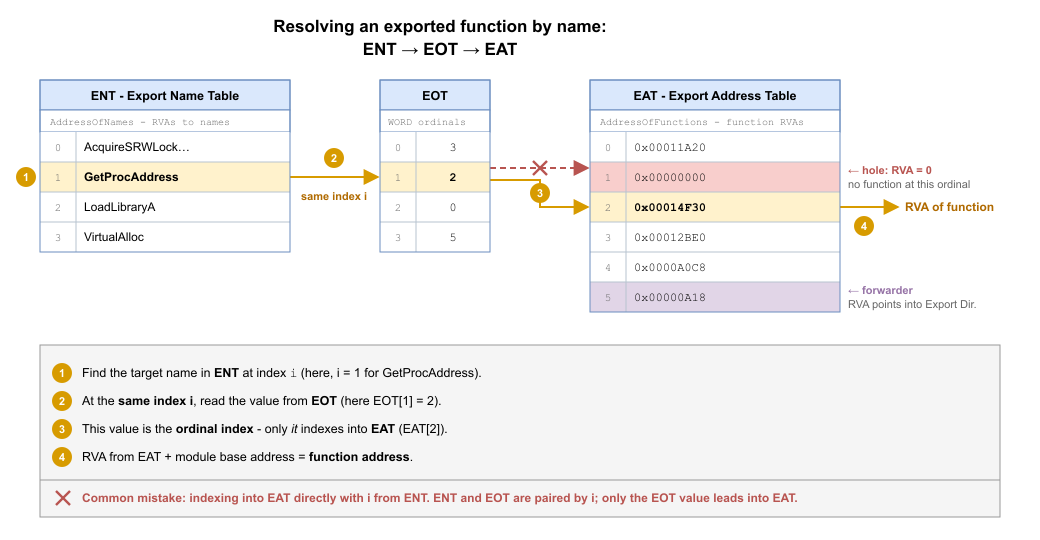
Watch out! Many people labor under the mistaken belief that the name at index i corresponds to the EAT at index i. But that’s a completely wrong assumption and will lead to an error. We have to proceed from the fact that the Export Name Table and the Export Ordinal Table are paired by i in the style of: the i-th string == the i-th ordinal index. Only this ordinal index is the index into the Export Address Table. This is the most common source of errors for beginners.
Even though the description of this three-stage mechanism sounds fairly complicated, the implementation itself in assembly is straightforward:
; RCX = base address of the module
; R8  = RVA of the EOT table (AddressOfNameOrdinals)
; R9  = RVA of the EAT table (AddressOfFunctions)
; RAX = index of the name match from the ENT (e.g., the i-th entry)

movzx edx, word ptr [r8 + rax * 2]  ; Step 1: Read the 16-bit index (ordinal) from the EOT
mov   eax, dword ptr [r9 + rdx * 4] ; Step 2: Read the 32-bit function RVA from the EAT
add   rax, rcx                      ; Step 3: Add the base address of the module
; RAX now contains the resulting absolute address of the function (VA)
The multiplication in square brackets corresponds to the size of the entries in each of the arrays. In the case of the EOT table, these are 16-bit values (WORD), which is why we multiply by two. In the EAT table, they are 32-bit values (DWORD), so we multiply by four.
For completeness, let me also cover a few situations that we don’t need to handle for today’s goal, but which we may run into in the future. Handling them will noticeably increase the reliability of the shellcode. The algorithm described works for the vast majority of ordinary functions, but there are cases where this naive implementation fails.
-
Forwarders: In some cases, the RVA read from the EAT does not point to the function’s code, but to a string such as
"NTDLL.RtlAllocateHeap". Such an export is in fact merely a redirect to a function in another library. In that case, we have to recursively repeat the entire resolution process in the target module. We can recognize forwarded functions by the fact that the RVA from the EAT falls within the range of the Export Directory, i.e., within the intervalVirtualAddress <= RVA < VirtualAddress + SizefromDataDirectory[0]. If we omitted this check, instead of jumping to the function’s code we would jump to a plain ASCII string representing the combination of the library name and the function name that actually provide the functionality. -
Ordinal-only exports: As already mentioned, a function need not be present in the ENT at all. If we look for such a function by name, we will never find it, because the name does not exist. The only way to reach it is directly through its ordinal.
-
Holes in the EAT: Not every EAT entry has to be valid. Slots corresponding to unassigned ordinals within the range may contain an RVA equal to
0, which means that no function exists at that ordinal. This zero needs to be handled; otherwise we would return the module’s base address as the "function address".
The entire mechanism described above is very similar to what the GetProcAddress function does internally. Writing your own implementation of GetProcAddress is an absolutely fundamental skill in the field of shellcode development — a cornerstone, so to speak, on which practically everything else is built. That is exactly why it is essential to understand the whole algorithm in detail.
We will now verify the theory about resolution by name directly on the export table of kernel32. From the IMAGE_EXPORT_DIRECTORY structure above, we know that the EAT (AddressOfFunctions) has the RVA 0xa4d58. Let’s print the first few of its entries. Each one is the RVA of one exported function:
0:000> dd kernel32+0xa4d58 L8
00007ffd`bcaf4d58  000a8f9f 000a8fd5 00037af0 0000e4e0
00007ffd`bcaf4d68  00057fe0 00045830 00037e70 00057d00
Above, we said that we can recognize a forwarder by the fact that its RVA falls within the range of the Export Directory, that is, within the interval [VirtualAddress, VirtualAddress + Size). For kernel32, this is [0xa4d30, 0xa4d30 + 0xec78), that is, [0xa4d30, 0xb39a8).
Let’s look at the first EAT entry, RVA 0xa8f9f. It falls within this range. So it should be a forwarder. We verify this by having the text string at this address printed using the da (display ASCII) command:
0:000> da kernel32+0xa8f9f
00007ffd`bcaf8f9f  "NTDLL.RtlAcquireSRWLockExclusive"
As we can see, at this address there is no code, but the ASCII string NTDLL.RtlAcquireSRWLockExclusive. This export is merely a redirect to the RtlAcquireSRWLockExclusive function in the ntdll library. If we naively jumped here as if to code, it would mean a crash of the application.
For contrast, let’s look at the third entry, RVA 0x37af0, which does not fall within the range of the Export Directory. We print what is there using the u (unassemble) command:
0:000> u kernel32+0x37af0 L3
KERNEL32!ActivateActCtxStub:
00007ffd`bca87af0 48ff25b9300500  jmp     qword ptr [KERNEL32!_imp_ActivateActCtx]
00007ffd`bca87af7 cc              int     3
00007ffd`bca87af8 cc              int     3
Here the RVA already points to actual code. We can see a jmp instruction. The difference is therefore clear: an RVA inside the range of the Export Directory points to a forwarder (a string), an RVA outside it points to executable code. This is exactly the check we have to perform for individual functions when developing shellcode, so that we don’t mistake a forwarder for a function’s address.
Summary of the offsets we need
For clarity — all the offsets we will use in the implementation:
base address + 0x3C                 →  e_lfanew
base address + e_lfanew + 0x88      →  DataDirectory[0].VirtualAddress (x64)
base address + Export Dir RVA       →  IMAGE_EXPORT_DIRECTORY
Export Dir + 0x18                   →  NumberOfNames
Export Dir + 0x1C                   →  AddressOfFunctions (RVA)
Export Dir + 0x20                   →  AddressOfNames (RVA)
Export Dir + 0x24                   →  AddressOfNameOrdinals (RVA)
Summary
- A PE file starts with the DOS Header, where
e_lfanewpoints to the NT Headers - The NT Headers contain the Optional Header with the DataDirectory field
DataDirectory[0]points to the Export Directory- The Export Directory contains three tables: EAT, ENT, and EOT
- Resolving a function by name proceeds via ENT → EOT → EAT
What’s coming in the next part
We have all the building blocks — we know how to find a module in memory and how to extract a function’s address from its PE structure. In the next part, we will combine these steps into a working implementation of our own GetProcAddress in assembly.
References
- [1] PE Format - Microsoft
- [2] Peering Inside the PE: A Tour of the Win32 Portable Executable File Format - Microsoft
- [3] An In-Depth Look into the Win32 Portable Executable File Format, Part 2 - Microsoft
- [4] struct IMAGE_DOS_HEADER - NirSoft
- [5] Tiny PE - phreedom.org
- [6] struct IMAGE_NT_HEADERS64 - Microsoft
- [7] struct IMAGE_FILE_HEADER - Microsoft
- [8] struct IMAGE_OPTIONAL_HEADER64 - Microsoft
- [9] struct IMAGE_DATA_DIRECTORY - Microsoft