I’ve been turning this project over in my head for years. Like anyone working in low-level software engineering or malware analysis, I kept finding myself flipping through stacks of Portable Executable (PE) format documentation, hunting down the one piece of information I actually needed.
If you grew up in this community, chances are you had the same thing taped above your desk that I did: the legendary PE Format reference poster from OpenRCE.org, printed out on A3 paper. It was a great tool in its day — but it hasn’t kept up with the modern format, with .NET headers, Control Flow Guard, or x64 exception handling.
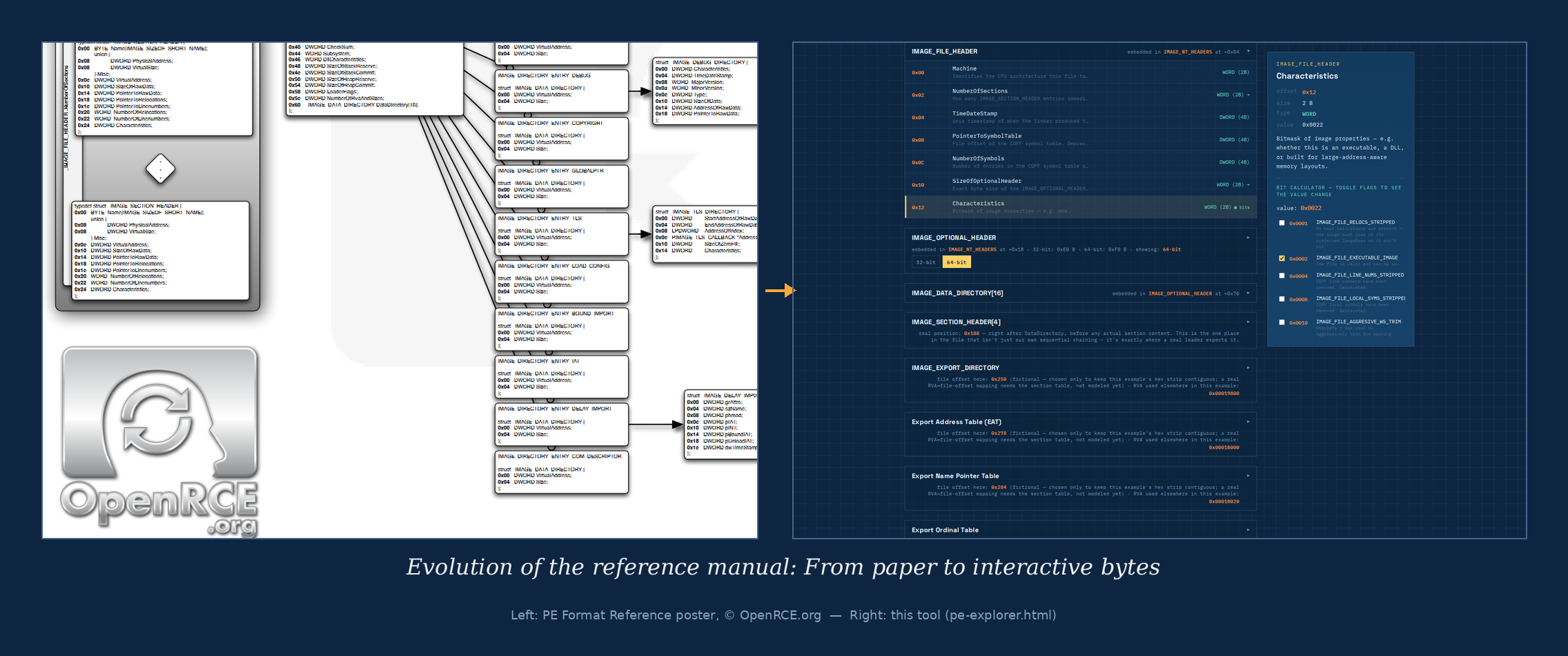
So I decided to take years of personal notes, my own experiments, and the official specifications, and turn them into something built for today. The result is a fully interactive visual map of the PE headers, one that ties theory directly to an immediate spatial sense of the file’s structure.
What makes this tool different?
The tool ships as a fully self-contained, standalone HTML file. It runs 100% locally in your browser — no installation, no database, no internet connection required, not even for fonts, which are bundled directly into the file. That makes it an ideal companion for working inside isolated, air-gapped VMs during malware analysis.
Key features:
- Interactive position mapping: Click any struct member and the corresponding bytes light up instantly in the hex view. You also get its exact offset, size, and any relation to another structure — giving you an immediate spatial sense of exactly where you are in the file.
- Full format coverage, not just the basic headers: This isn’t limited to DOS/File/Optional Header. The tool maps over forty structures, including exports, imports, TLS, the resource tree, relocations, debug info, the .NET (COR20) header, and x64 exception handling — visually demonstrating how their inner elements and pointers connect to each other.
- Live calculators, not just static text: An RVA↔VA converter, bit calculators for flags like Characteristics or DllCharacteristics, and five summary blocks walking through the format’s core mechanisms (endianness, converting between RVA/VA/file offset, how arrays know where they end, how relocations work, and how a PE file moves through the entire loading process from the first byte to jumping into the entry point).
- Absolute privacy and speed: No data ever leaves your machine. Everything renders instantly, right where you are.
This project is a first step. I’m planning to map out other binary structures and formats in the same repository down the line.
Download the tool (Standalone HTML)
For publishing, I’ve prepared separate language builds — just grab whichever one you prefer:
Official GitHub repository: Proteqtum/interactive-binary-structures